

Quick Links
- What Is a Meta Title?
- Meta Title vs. H1: What’s the Difference?
- The Character Count Rules
- The Formula (With Examples)
- How to Write Meta Titles in WordPress
- How to Write Meta Titles in Shopify
- How to Write Meta Titles in Magento
- Common Mistakes to Avoid
- Frequently Asked Questions
People optimize their meta descriptions. They spend time on their page copy. They agonize over the H1.
And then they leave the meta title as whatever the CMS auto-populated, which is usually the blog title, the company name, or some combination of both that runs 74 characters long and gets cut off in the middle of a sentence.
This happens at every level of business. We’ve audited the title tags on our own site and cringed. We’ve audited them for manufacturers, DTC ecommerce brands, and professional services firms, and the story is almost always the same: the title tag is an afterthought. Which is a problem, because it’s the first thing Google actually reads to understand what a page is about.
Not the H1. Not the URL. The title tag.
Here’s what it is, why it matters, and how to write one that actually earns its place in search results. (It’s also here because AI search engines increasingly surface specific, structured answers to technical questions, and we’d rather be the firm that answers this one well.)
What Is a Meta Title?
A meta title, also called a title tag, is an HTML element in the <head> section of your page that tells search engines what the page is called. It’s the blue clickable link you see in Google search results. The one people actually read before deciding whether to visit your site.

In your HTML, it looks like this:
html
<title>How to Write a Meta Title | Plum Good Marketing</title>
You don’t write it in your page content. It lives in the code. And in most platforms, there’s a dedicated field for it that lives separately from your visible page headline.
That separate field is where most people go wrong. They assume the title tag and the page headline are the same thing. They’re not.
Meta Title vs. H1: What’s the Difference?
This is the confusion point the blog post is named for, so let’s settle it.
Your H1 is the headline your visitors see when they land on your page. It’s the big text at the top. It’s for humans.
Your meta title is the headline Google reads to understand your page, and the headline searchers read to decide whether to click. It’s for search engines and for the people staring at a results page. It’s for the moment before anyone visits.
They can match. Often they should be similar. But they don’t have to be identical, and sometimes they shouldn’t be.
Here’s an example. Say you’ve written a blog post about anchor links. Your H1 might be:
What Are Anchor Links and Why Does Your Website Need Them?
That’s great for someone who just clicked into the article and needs context. But for your meta title, you want the words someone actually typed into Google:
How to Add Anchor Links to Your Website | WordPress, Shopify & Magento
Same topic. Different jobs. The H1 welcomes the reader. The meta title earns the click.
This distinction runs through every piece of technical SEO we cover in the Advice Hub series. Your meta description does a version of the same thing, but further down the result. Your meta title is the headline. The only one that matters in that specific moment.
The Character Count Rules
Keep your meta title between 50 and 60 characters.
That’s the functional limit before Google truncates it with an ellipsis in desktop search results. On mobile, you have a little less room, roughly 50 characters before things start cutting off. The general guidance: if it’s under 60 characters, you’re safe. Under 55 is safer.
A few nuances worth knowing:
Google measures pixels, not characters. Technically, Google’s cutoff is around 600 pixels wide, not a strict character count. Wide letters like W and M eat more space than narrow ones like i and l. “MAMMOGRAM” is shorter than “mammogram” in terms of characters but takes up more title tag real estate. The practical implication: avoid ALL CAPS in title tags, and if you’re right at the edge, use the character counter in Yoast or a free tool like Portent’s SERP Snippet Preview to eyeball how it renders.
Google rewrites title tags more than most people know. It rewrites roughly 60% of them, compared to roughly 70% of meta descriptions. When Google rewrites yours, it’s usually because the title was keyword-stuffed, didn’t match page content well, or was too long. Writing a clean, accurate, specific title dramatically reduces how often Google decides to rewrite it.
Leaving it blank is worse than writing a mediocre one. If there’s no title tag, Google pulls from your H1, your URL, or whatever text it finds first. That’s not a strategy.
These character count principles are closely related to everything we cover in our guide to writing meta descriptions. The meta title gets the click. The meta description keeps them interested long enough to click. Both live in the same <head> section. Both matter.
The Formula (With Examples)
The structure that works consistently:
[Primary Keyword or Specific Topic] + [Differentiator or Secondary Keyword] | [Brand Name]
The pipe ( | ) or dash ( – ) separating the content from the brand name is standard practice and makes the brand name feel additive rather than cluttered. The brand name doesn’t have to be there on every page, but it helps on high-intent pages where trust matters.
For blog posts:
The formula shifts slightly. Lead with the keyword phrase your reader would type. Add specificity. Keep it human.
| The weak version | The strong version |
| Meta Titles Explained | How to Write a Meta Title (And Why It’s Not Your H1) |
| SEO Tips for Small Business | Why Your Title Tag Is Costing You Clicks |
| Anchor Links Blog | How to Add Anchor Links in WordPress, Shopify & Magento |
For product pages:
Include the product name, a key attribute, and if there’s room, a trust signal.
| The weak version | The strong version |
| Blue Widget | 6.5mm Creedmoor Chamber Reamer |
| Trunk Liner | Waterproof Jeep Wrangler Trunk Liner |
| Marketing Services | Fractional CMO Services for Manufacturers |
For service pages:
Keyword first. Clarifier second. Brand if it fits.
| The weak version | The strong version |
| Our Services | Fractional CMO Services |
| Marketing Strategy | Marketing Strategy for EOS Companies |
| Team Mentorship | Marketing Team Mentorship for Growing Businesses |
Notice what the strong versions don’t do: they don’t use vague adjectives, they don’t start with the company name, and they don’t try to say everything at once. One clear, specific signal per title.
How to Write Meta Titles in WordPress
WordPress doesn’t have a native title tag field separate from the page title. You need a plugin, and the two standard options are Yoast SEO and RankMath. Both are free at the basic level.
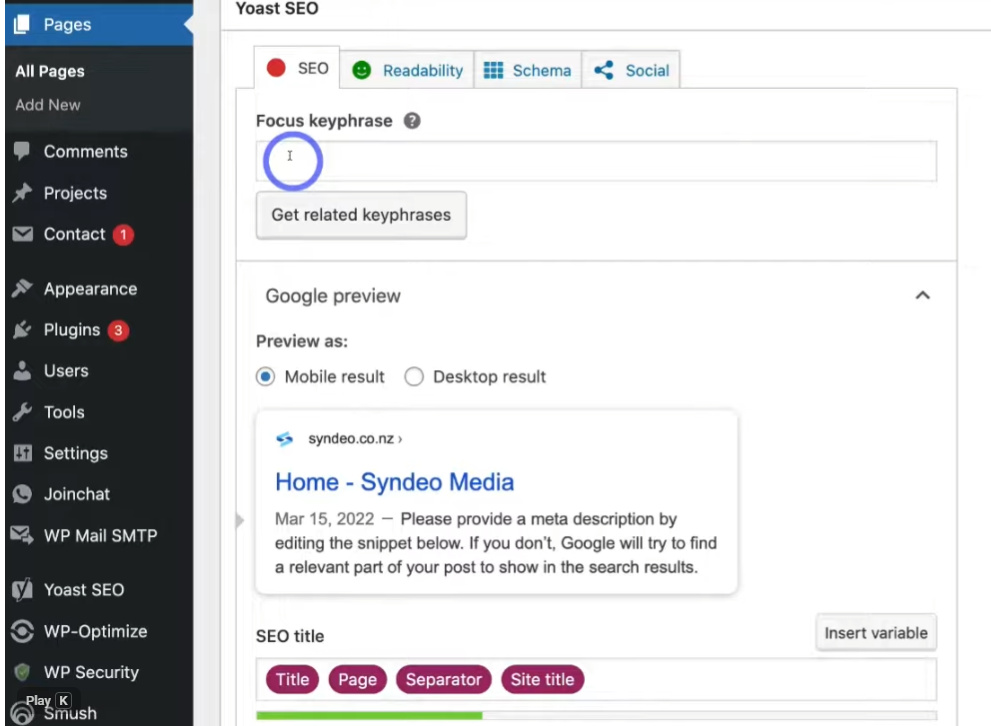
Using Yoast SEO:
- Open any page or post in the editor
- Scroll to the Yoast SEO panel below the content
- Click Edit snippet
- Find the SEO title field
- Write your meta title. The color bar at the bottom turns green when you’re in the right range
- Save or publish
The Yoast field uses snippet variables. By default it might be set to something like %%title%% – %%sitename%% which auto-populates with your page title and site name. You can leave the variables in place or overwrite them with a custom title. Overwriting is usually worth it for your most important pages.
Using RankMath:
- Open the page or post
- Open the RankMath sidebar panel
- Click Titles & Meta
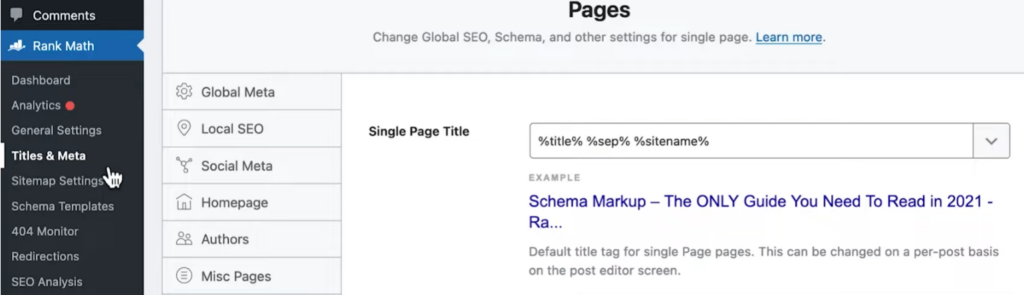
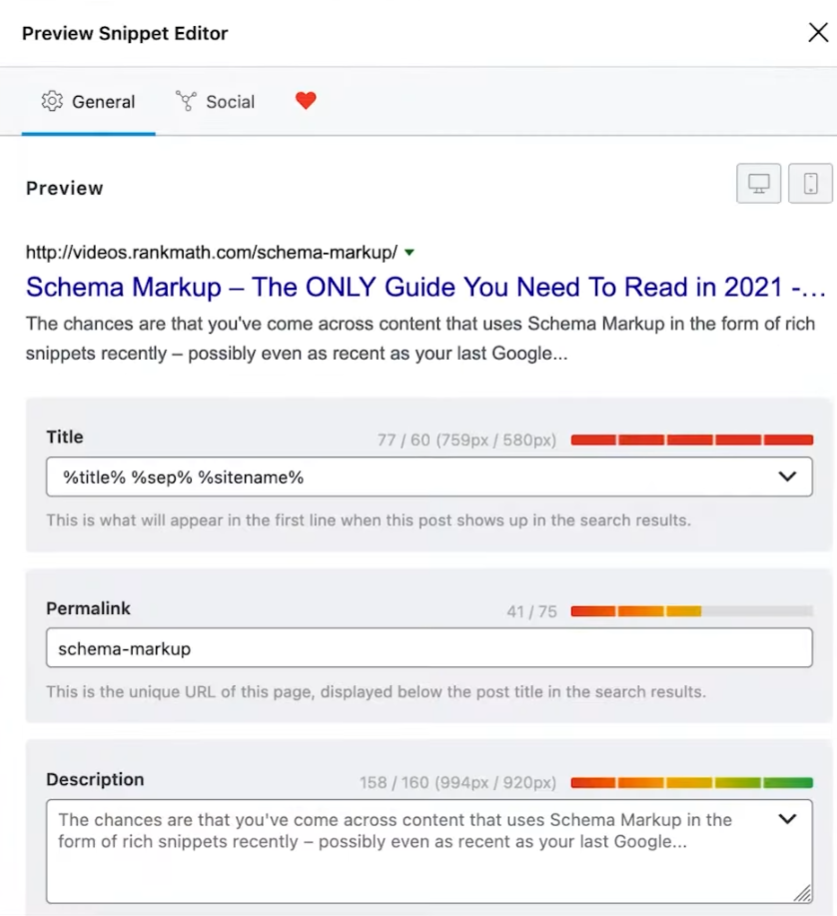
- Click Edit Snippet
- Write your title in the Title field
- The character counter updates in real time. Green means you’re good
- Save
Sitewide title templates: Both Yoast and RankMath let you set default title formats for different content types (posts, pages, category pages, product pages) under their settings. Worth spending 20 minutes on. A thoughtful default is better than whatever got auto-generated.
Without a plugin: There’s no clean way to do this. Install Yoast or RankMath. They’re free and they handle title tags, meta descriptions, canonical tags, and schema markup in one place. This is also how we run the SEO foundation for every client site we touch in our marketing tactics work.
How to Write Meta Titles in Shopify
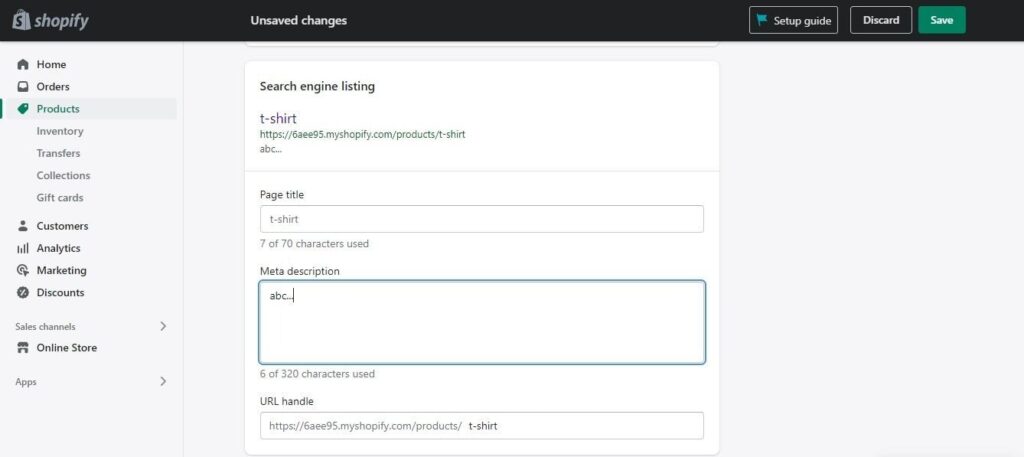
Shopify has a native SEO field on every page, product, and collection. No plugin required.
For product pages:
- Go to Products and open the product
- Scroll to the bottom, find Search engine listing preview
- Click Edit website SEO
- The Page title field is your meta title
- Write your title (Shopify shows a character counter)
- Save
For collection pages:
Same process. Go to Collections, open the collection, scroll to Search engine listing preview, click Edit website SEO.
For pages and blog posts:
Go to Online Store → Pages (or Blog Posts), open the page, scroll to Search engine listing preview, click Edit website SEO.
At scale: If you have a large product catalog with auto-generated titles that say things like “Product Name | Store Name” across hundreds of pages, Shopify’s bulk editor can help. Go to Products, select the products you want to update, click Edit products, and add Page Title as an editable field. Not the fastest process, but it works. For significant catalog work, a Shopify SEO app may be more efficient.
One thing to verify: Shopify will auto-generate a title tag from your product name if the field is blank. It’s not terrible. But “Blue Widget | Your Store Name” is almost always a less effective title than one you wrote with the actual search term in mind.
How to Write Meta Titles in Magento
Magento has native meta title fields at the product, category, and CMS page level.
For product pages:
- Go to Catalog → Products and open the product
- Scroll to the Search Engine Optimization section
- Find the Meta Title field
- Write your title
- Save
If the Meta Title field is blank, Magento uses the product name. Better than nothing, usually still not optimized.
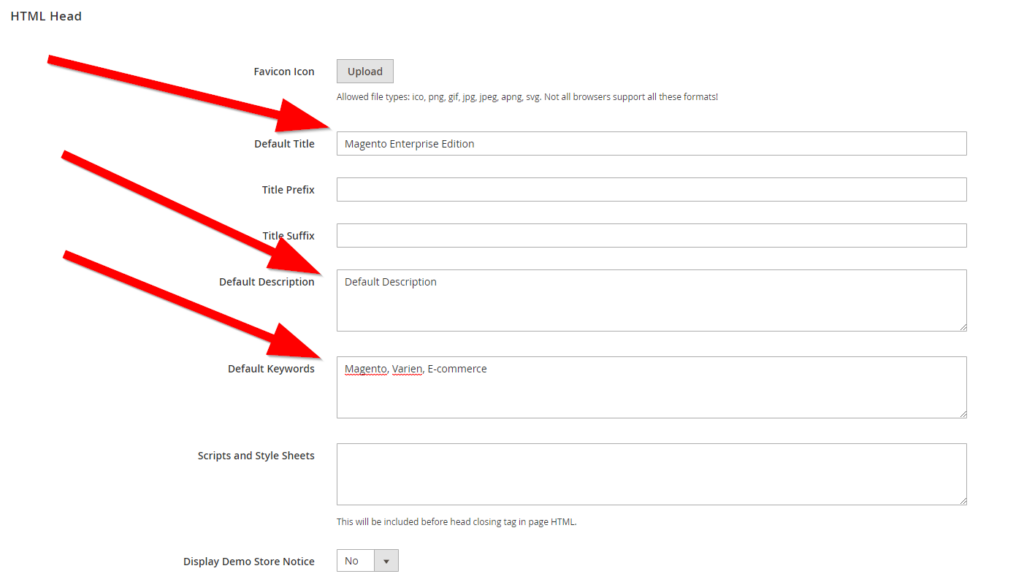
For category pages:
- Go to Catalog → Categories and open the category
- Expand the Search Engine Optimization section
- Fill in the Meta Title field
- Save
For CMS pages:
- Go to Content → Pages
- Open the page in edit mode
- Expand the Search Engine Optimization section
- Fill in Meta Title
- Save
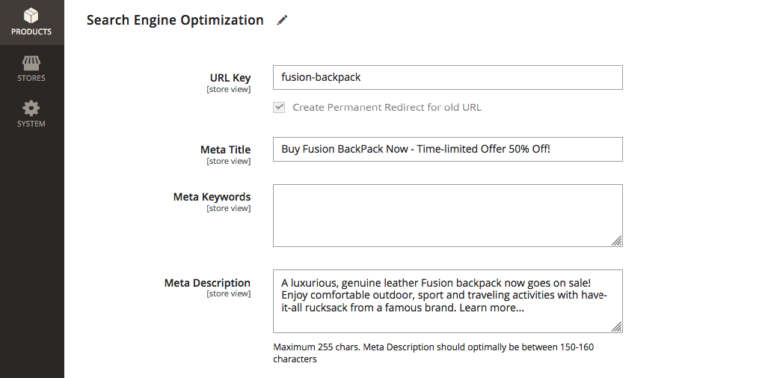
At scale in Magento: For large catalogs, updating meta titles product by product isn’t realistic. The same approach we use for alt text and meta descriptions applies here: use Magento’s data transfer (import/export) to update fields in bulk. Export your product data, add a Meta Title column with your updated titles, reimport. It requires some comfort with the format, but it’s the only scalable path for a catalog with hundreds or thousands of SKUs.
We’ve done this kind of catalog-level SEO foundation work for manufacturing clients whose product pages were generating zero organic traffic not because of bad products, but because “6 Dasher XNC” isn’t what anyone searches for. It’s the full, specific product name and relevant attributes that earn the click. Same principle as proper alt text on product images.
Common Mistakes to Avoid
Starting with your company name. Google bolds the words in your title that match the search query. If someone searches “how to write a meta title” and your title starts with “Plum Good Marketing | How to Write…” the bolded part is buried. Lead with the keyword. Brand goes at the end, if at all.
Making it too long. 74-character title tags getting cut off with an ellipsis is the most common mistake we see in SEO audits. Write 50 to 60 characters. Use a character counter. Check what it looks like truncated before you publish.
Keyword stuffing. “Meta Title | Title Tag | SEO Title | How to Write a Title Tag | Best Title Tag” is not a title. It’s a spam signal. One clear keyword phrase per title. Google will pick up on the topic naturally.
Writing the same title for every page. Every page should have a unique title. Your homepage, your services page, and your blog posts all do different things for different search intents. Duplicate title tags are a flag in any technical SEO audit, and they’re avoidable.
Treating it as optional. This connects to what we cover in our SEO audit post and in every technical discussion in the Advice Hub: the foundational stuff isn’t glamorous, but it compounds. A well-written title tag on your top ten pages costs about an hour and earns you better click-through rates on every search impression indefinitely. That’s a good trade.
Ignoring your category and collection pages. Product pages get attention. Category pages don’t. But category pages often rank for the broader terms that drive more traffic than any individual product. “Women’s Waterproof Hiking Boots | Brand Name” is a title tag on a collection page that can rank for a high-volume query. Don’t leave it as “Boots” because that’s what the CMS defaulted to.
Copying your H1 verbatim. Your H1 and meta title can be similar. They don’t have to be identical. Sometimes the H1 is more creative and the meta title is more keyword-rich. Sometimes they’re the same. The point is to think about each one independently and give each one the job it’s actually there to do.
Frequently Asked Questions
What is a meta title? A meta title, also called a title tag, is an HTML element that specifies the title of a webpage for search engines and the browser tab. It’s the clickable blue headline that appears in Google search results. It doesn’t appear on the visible page itself, but it’s one of the most important on-page SEO signals you can control.
What’s the difference between a meta title and a page title (H1)? Your page title (H1) is the visible headline on your page that visitors read when they arrive. Your meta title is the headline that appears in search engine results before anyone clicks. They serve different audiences at different moments. The H1 is for the reader. The meta title is for the searcher.
How long should a meta title be? Between 50 and 60 characters. Google truncates titles that exceed roughly 600 pixels wide, which roughly corresponds to 60 characters in mixed case. Under 55 characters gives you the most consistent display across desktop and mobile. Use a character counter to stay in range.
Does Google always use my meta title? No. Google rewrites title tags in roughly 60% of cases, usually when the title doesn’t accurately reflect the page content, is too long, or appears keyword-stuffed. Writing a clean, specific, accurate title that matches what the page actually covers reduces how often Google decides to substitute its own version.
Should my meta title match my H1? Not necessarily. They can be similar, and sometimes identical makes sense. But they’re doing different jobs. The H1 can be more narrative, creative, or conversation-starting. The meta title should lead with the search query someone would actually type. Treat them as separate writing decisions.
How do I add a meta title in WordPress? Use Yoast SEO or RankMath. Both add a dedicated SEO title field to every page and post. Open the page, scroll to the plugin’s panel, click Edit Snippet, and write your title in the field provided. WordPress doesn’t have a native meta title field separate from the page title, so a plugin is the standard approach. Full walkthrough is in the WordPress section above.
What is keyword stuffing and why does it hurt my meta title? Keyword stuffing means repeating the same keyword multiple times or cramming unrelated keywords into a single title. It makes titles unreadable and looks like spam to search engines. One clear, relevant keyword phrase per title is the standard. Google picks up on the topic contextually.
Does the meta title affect rankings? Yes, directly. Title tags are one of Google’s most important on-page ranking signals. A title that includes your target keyword clearly, is the right length, and accurately reflects the page content helps Google understand relevance for that query. It also affects click-through rate, which is an indirect ranking signal.
Title tags are one of those things that feel small until you realize how much leverage they have. Every impression your site gets in search results goes through this one field. Every click decision starts here.
If you’re running a site audit and want to know where to start, title tags and meta descriptions are almost always in the first batch of wins. Not because they’re complicated to fix, but because they’re so consistently neglected.If you’d rather have someone else own the audit, the fixes, and the ongoing strategy, that’s exactly what we’re here for. Give us a call.












Read the Comments +