

Quick Links
- Why Email Segmentation Matters
- Lists vs. Segments in Klaviyo: What’s the Difference?
- How to Create a Segment in Klaviyo: Step by Step
- Understanding Klaviyo’s Segment Conditions
- Email Segment Ideas for Ecommerce
- Email Segment Ideas for B2B
- Engagement-Based Segments and Deliverability
- Common Segmentation Mistakes
- Frequently Asked Questions
A fractional CMO agency writing a step-by-step Klaviyo tutorial might seem off brand. Fair. But email segmentation is one of the highest-leverage things we do inside client accounts — and “send it to everyone” is one of the most expensive default habits in small business marketing. We’ve watched email-attributed revenue triple for clients not because they spent more on ads or grew their list, but because they got more precise about who received what message and when.
It’s also here because the gap between a batch-and-blast email program and a properly segmented one shows up directly on a revenue line — and we’d rather be the firm that explains exactly how to close it.
Here’s everything you need to know about segmenting your email list in Klaviyo.
Why Email Segmentation Matters
Sending the same email to every person on your list is the email equivalent of handing the same flyer to everyone who walks by your store — the retired couple, the teenager, the competitor, the loyal customer who’s been buying from you for five years. Some of it lands. Most of it doesn’t. And the people who didn’t want the flyer start to resent getting it.
Email segmentation is the practice of dividing your subscriber list into smaller groups based on shared characteristics — what they’ve bought, how they’ve engaged, where they are in the customer journey — and sending each group content that’s relevant to them specifically.
The business case is straightforward. Research from Mailchimp shows that segmented campaigns average significantly higher open rates, click rates, and revenue per recipient than non-segmented sends. Klaviyo’s own platform data shows that targeted segments routinely outperform full-list broadcasts by a wide margin — particularly for ecommerce stores where purchase behavior creates natural, meaningful audience divisions.
But the case for segmentation isn’t just about better metrics. It’s about protecting what you’ve built:
Deliverability. When you send irrelevant emails to people who don’t want them, they stop opening, start deleting, and eventually mark as spam. Enough spam complaints and low engagement signals and your emails start landing in junk folders — for everyone, including the people who do want to hear from you. Segmentation keeps your engaged subscribers engaged and your unengaged ones from dragging down your sender reputation.
List health. A list of 10,000 subscribers who regularly open and click is worth far more than a list of 50,000 where 80% are dormant. Segmentation lets you identify the dormant segment, run a specific re-engagement campaign for them, and suppress the ones who don’t respond — protecting the value of the active portion.
Revenue concentration. In most ecommerce businesses, a small percentage of customers drives a large percentage of revenue. Segmentation lets you identify and communicate with your high-value customers differently than your one-time purchasers — offering them the experiences and incentives that keep them in that category.
Lists vs. Segments in Klaviyo: What’s the Difference?
This is the most commonly misunderstood distinction in Klaviyo, and getting it right changes how you build your entire email infrastructure.
Lists in Klaviyo
A list in Klaviyo is a static group of profiles. People are added to a list through an explicit action — subscribing via a form, being manually imported, or being added by an integration. Lists are permission-based: a profile must actively opt in to be included.
Lists are best used for:
- Your primary opt-in list (the “Newsletter” or “Email Subscribers” list that new subscribers join)
- SMS subscribers
- Any group where explicit consent is the defining characteristic
- Suppression lists (contacts who should never receive marketing emails)
Profiles stay on a list until they unsubscribe or are manually removed. Lists do not automatically update based on behavior.
Segments in Klaviyo
A segment is a dynamic group of profiles that Klaviyo builds and rebuilds automatically based on conditions you define. A segment doesn’t hold contacts permanently — it shows you which profiles currently meet the conditions. When a profile’s behavior changes and they no longer meet the conditions, they drop out of the segment automatically. When a new profile meets the conditions, they join automatically.
Segments are best used for:
- Any behavioral grouping (purchased in the last 30 days, viewed a product, abandoned a cart)
- Engagement tiers (active openers, unengaged subscribers)
- Customer lifecycle stages (new subscriber, first-time buyer, repeat purchaser, at-risk)
- Predictive groups (likely to churn, high predicted lifetime value)
- Campaign targeting (anyone who should receive a specific promotion)
Profiles cannot subscribe to a segment. Segments are not deliverable on their own — they are used as the recipient group when you send a campaign.
The Practical Difference
Here’s the clearest way to think about it: use lists for consent, use segments for targeting.
Your subscriber joins your list once. From that point forward, segments determine which messages they receive based on everything they do — or don’t do — after joining.
Most Klaviyo users with small lists use lists for everything, which limits what they can do. As soon as you start creating segments, you unlock the full power of what the platform can actually do.
How to Create a Segment in Klaviyo: Step by Step
- Log in to Klaviyo and navigate to Audience → Segments in the left sidebar.
- Click Create Segment in the upper right.
- Give your segment a clear, descriptive name. “Active buyers — last 90 days” is useful. “Segment 4” is not. You’ll accumulate segments quickly and you need to be able to identify them at a glance.
- Build your conditions. Klaviyo’s segment builder uses a combination of:
- AND logic: the profile must meet all conditions
- OR logic: the profile must meet at least one condition
- Click Preview to see the current size of the segment and a sample of the profiles it includes. If the segment looks too large or too small, review your conditions.
- Click Save Segment. Klaviyo will build the segment (this can take a few minutes for large lists) and it will update automatically from this point forward.
Understanding Klaviyo’s Segment Conditions
Klaviyo’s segment conditions pull from several data sources. Understanding what’s available helps you build more precise segments.
Properties About Someone
These are profile-level attributes — things you know about who the person is, not what they’ve done. Examples:
- Email — specific email addresses, domains
- Location — city, region, country (populated by Klaviyo from IP data or profile data)
- Custom properties — any data you’ve passed to Klaviyo via integrations, forms, or API (industry, company size, customer type, product preferences)
- Predictive analytics — Klaviyo’s AI-generated predictions including expected date of next order, predicted customer lifetime value, and churn risk
What Someone Has Done (or Not Done)
These are event-based conditions — behaviors tracked by Klaviyo through integrations, embedded tracking, or custom events. For Shopify stores, Klaviyo automatically tracks:
- Placed Order
- Ordered Product (specific product or product category)
- Started Checkout / Checkout Started
- Viewed Product
- Fulfilled Order
- Cancelled Order
- Refunded Order
You can build conditions around any of these events, including:
- Whether the event happened or didn’t happen
- How many times it happened
- When it happened (in the last X days, more than X days ago, between two dates)
- The value associated with the event (order value greater than X)
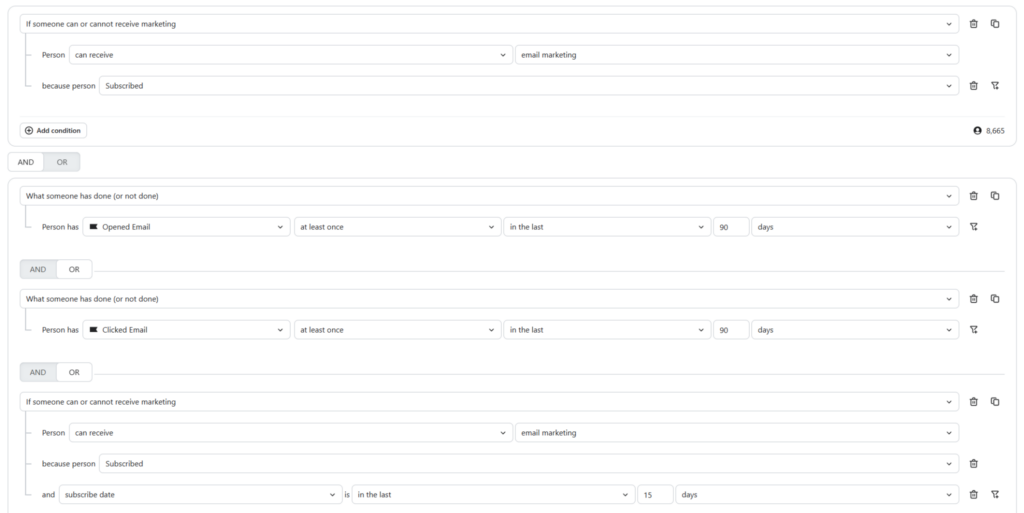
List Membership
You can build segments that include or exclude profiles based on which lists they belong to. This is useful for excluding certain subscriber types from specific campaigns.
Predictive Analytics Conditions
Klaviyo’s predictive analytics are available on most plans and give you access to AI-generated estimates including:
- Predicted CLV — estimated lifetime value over the next 90 days to 5 years
- Expected date of next order — Klaviyo’s estimate of when the customer is likely to purchase again
- Historic AOV — average order value across past purchases
- Churn risk — likelihood the customer won’t purchase again
These can be used as segment conditions, allowing you to target high-predicted-value customers with different messaging than low-CLV customers.
Email Segment Ideas for Ecommerce
These are the segments we build first for most ecommerce clients. Start with the ones that match your current business priorities.
Customer Lifecycle Segments
New subscribers, no purchase Condition: Joined list in the last 30 days AND has not placed an order. This is your acquisition welcome window. These people have shown interest but haven’t converted — they should be in a welcome flow or targeted with conversion-focused content.
First-time buyers Condition: Placed exactly one order (lifetime). This is your largest opportunity for second purchase — the transition from one-time buyer to repeat customer is the most valuable conversion in ecommerce, and it happens most easily in the window right after the first purchase.
Repeat purchasers Condition: Placed two or more orders. This group has demonstrated loyalty. They should receive different messaging — less promotional urgency, more relationship-focused content, early access to new products, loyalty incentives.
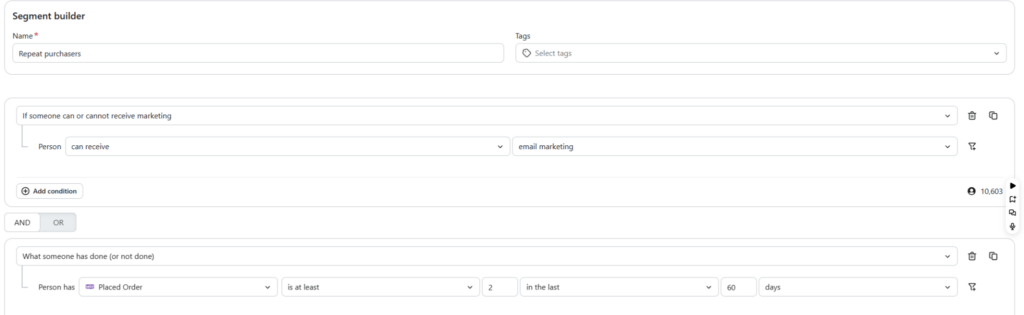
VIP / High-value customers Condition: Placed order AND total spend over [X] in lifetime (set your own threshold based on your AOV and customer base). These are your best customers. They should feel like they’re getting something the rest of the list isn’t.
At-risk customers Condition: Has placed an order AND last order was more than 90 days ago (adjust based on your typical repurchase window). This is your win-back population — customers who have purchased before and have gone quiet. They need a different message than someone who has never bought.
Lapsed customers Condition: Has placed an order AND last order was more than 180 days ago. Deeper into the lapse cycle — these need a more aggressive re-engagement approach or should be suppressed if they don’t respond.
Behavioral Segments
Browse abandoners (non-purchasers) Condition: Viewed product in the last 7 days AND has not placed an order AND is not in a cart abandonment flow. These profiles are showing purchase intent — they should receive a targeted email acknowledging the product they viewed.
High-engagement non-purchasers Condition: Opened email in the last 30 days AND has not placed any order. These people are interested enough to open your emails but haven’t converted. Something is preventing the purchase — price, timing, trust, uncertainty. A targeted campaign addressing that friction can move them.
Category interest segments Condition: Ordered product from [category] OR viewed product in [category] in the last 60 days. If you sell across multiple product categories, these segments let you send category-relevant content to the people most likely to act on it.
Post-purchase follow-up Condition: Placed order in the last 7-14 days. Use this to trigger review requests, cross-sell recommendations, or onboarding content for new customers.
Engagement Segments
Active subscribers Condition: Opened or clicked email in the last 90 days. Your most engaged audience — this is who you want to prioritize for important campaigns.
Warming up (new but engaged) Condition: Joined list in the last 60 days AND opened at least one email. Early positive signal. Nurture this group carefully.
Unengaged subscribers Condition: Has not opened any email in the last 90-120 days. Important for deliverability management — see the deliverability section below.
Email Segment Ideas for B2B
B2B email segmentation requires a different framework than ecommerce because the behavioral signals are different — there are no product views or cart abandonments. The signals that matter are content engagement, form submissions, and stage in the buying process.
Lead Stage Segments
New leads, no meeting booked Condition: Subscribed via [specific lead magnet or form] AND has not submitted [meeting request form or CTA form]. These leads have shown enough interest to opt in but haven’t taken the next step. The job of email here is to reduce friction and build trust until they’re ready.
Engaged leads (content consumers) Condition: Has clicked email in the last 30 days AND has not booked a meeting. Actively engaged with your content — a targeted reach-out or low-friction next step offer (checklist, audit, quick call) is likely to convert.
Stalled leads Condition: Subscribed more than 60 days ago AND has opened at least one email AND has not taken a conversion action. This group needs a re-engagement push — a specific offer, a new angle, or a direct question.
Geography-based segments Condition: Location is [city/region] AND is subscribed. Useful for event invitations, local case studies, or territory-based outreach.
Industry or role segments Condition: Custom property “Industry” equals [manufacturing / professional services / etc.]. This requires collecting industry or role data at signup — worth the extra form field if your services differ meaningfully by industry.
Engagement Segments for B2B
Content topic interest Condition: Clicked link related to [specific topic] in the last 60 days. If you publish content across multiple topics (EOS, manufacturing, brand), segmenting by what someone has actually engaged with allows you to follow up with related content or offers.
Event attendees Condition: Custom property “Attended Event” equals [event name]. People who have attended a webinar or in-person event are warmer leads — they should receive a distinct follow-up sequence.
Engagement-Based Segments and Deliverability
This is the part most email marketers underinvest in — and it has the highest impact on whether your emails land in inboxes at all.
Email deliverability — whether your emails reach the inbox or the spam folder — is influenced significantly by engagement signals. When a large portion of your sends go to people who never open or click, inbox providers interpret that as a signal that your emails aren’t wanted. Over time, this suppresses deliverability across your entire list, including for the people who do want to hear from you.
The solution is active list hygiene through engagement segmentation.
The Engaged / Unengaged Framework
Create two core engagement segments and use them consistently:
Engaged subscribers Condition: Opened or clicked any email in the last 90 days OR placed an order in the last 90 days. This is your “safe to send” audience for important campaigns.
Unengaged subscribers Condition: Has received at least 5 emails AND has not opened any email in the last 90 days AND has not placed an order in the last 90 days. This is your deliverability risk group.
For unengaged subscribers, the standard playbook is:
- Run a dedicated re-engagement campaign (2-3 emails with a clear subject line like “Are we still good?”)
- Offer a clear reason to stay subscribed
- If they don’t engage after the re-engagement sequence, suppress them
Suppression is not the same as unsubscribing them. Suppressed profiles stay in Klaviyo but don’t receive marketing emails. You can reactivate them later if circumstances change.
Sunset Segments
A sunset segment is a defined group of unengaged profiles that are suppressed after a final re-engagement attempt. Define yours based on your sending frequency:
- High-frequency senders (3+ per week): unengaged after 60 days
- Medium-frequency senders (1-2 per week): unengaged after 90 days
- Low-frequency senders (monthly): unengaged after 120-180 days
Running a sunset flow is one of the highest-leverage things you can do for deliverability on a Klaviyo account that hasn’t been actively maintained.
Common Segmentation Mistakes
Sending everything to your full list The most common and most costly mistake. Sending every campaign to all subscribers regardless of relevance dilutes performance, damages deliverability, and trains your audience to tune you out. If you’re only doing one thing after reading this post, create an engaged subscriber segment and start there.
Using lists where segments should be used Building a new list for every audience group — “buyers,” “VIPs,” “local customers” — creates a management nightmare and misses the dynamic, real-time power of Klaviyo’s segment engine. Lists are for consent. Segments are for targeting.
Naming segments generically “Segment 1,” “New Segment,” “Campaign Audience” — these become unmanageable quickly. Name every segment descriptively: “Ecomm — Repeat Buyers — 2+ Orders” or “B2B — Engaged Non-Converts — Last 30 Days.” Your future self will thank you.
Building segments with no clear campaign purpose Every segment should answer the question: what am I going to send these people specifically, and why? A segment without a corresponding content strategy is just an organizational artifact. Build segments around what you’re actually going to do with them.
Overlapping segments without suppression logic If your “Active Buyers” segment and your “VIP” segment overlap significantly, and you send to both on the same day without suppression logic, some contacts receive your email twice. Build exclusion conditions into your campaigns — when sending to VIPs, exclude non-VIP active buyers, and vice versa.
Ignoring predictive analytics Klaviyo’s predictive CLV and churn risk features are available on most plans and are significantly underused. Building segments around high predicted CLV (customers worth investing more in) and high churn risk (customers who might be leaving) changes the economics of what you can justify spending to keep them.
Setting it and forgetting it Segments are dynamic but your strategy around them isn’t. Review your segment performance quarterly — look at open rates, click rates, and revenue per recipient for each segment. If a segment is consistently underperforming, the issue is usually the message, not the targeting.
Suppressing without reviewing Before you suppress your unengaged segment, look at it. Are these profiles real customers who went quiet? Wholesale suppression of a large engaged-at-some-point audience without a re-engagement attempt is a missed revenue opportunity.
Frequently Asked Questions
What is email segmentation? Email segmentation is the practice of dividing your email subscriber list into smaller groups based on shared characteristics — purchase behavior, engagement history, demographics, lifecycle stage, or interests — and sending each group content relevant to them specifically. Segmented emails consistently outperform full-list broadcasts on open rates, click rates, and revenue per recipient, because the message matches what each group actually needs.
What is the difference between lists and segments in Klaviyo? Lists in Klaviyo are static, consent-based groups that profiles join through an explicit opt-in action. Segments are dynamic groups that Klaviyo builds and rebuilds automatically based on behavioral and attribute conditions you define. Lists are for permission management. Segments are for targeting. Most email marketing strategy in Klaviyo is built on segments, not lists.
How many segments should I have in Klaviyo? There’s no universal number, but a reasonable starting point for an ecommerce brand is 8-12 core segments covering customer lifecycle stages, engagement tiers, and key behavioral groups. B2B companies typically need 5-8. The right number is however many you can act on with distinct messaging — segments you create but never use are just clutter.
Can I use segments in Klaviyo flows? Yes. Segments can be used as flow triggers (a flow starts when someone enters or exits a segment) and as flow filters (a flow applies only to profiles who meet certain segment conditions). Segment-triggered flows are particularly useful for lifecycle automation — triggering a win-back flow when a customer enters the “at-risk” segment, for example.
How often does Klaviyo update segments? Klaviyo updates segments in real time — as soon as a profile’s behavior changes and meets or no longer meets the segment conditions, they’re added or removed. This means your segment counts will fluctuate, which is expected behavior. You don’t need to manually refresh segments before sending.
What is the best way to segment an email list for a small business? Start with three segments: active subscribers (opened in the last 90 days), customers (placed at least one order), and new subscribers (joined in the last 30 days, no purchase). These three cover the most important distinctions in most small business email programs — engaged vs. unengaged, buyer vs. prospect, and new vs. established — without requiring complex behavioral data to build. Expand from there as your list grows and your data deepens.
What is a sunset segment in email marketing? A sunset segment is a group of unengaged subscribers who are targeted with a final re-engagement campaign and then suppressed from future sends if they don’t respond. Suppressing unengaged contacts protects email deliverability by removing profiles who consistently ignore your emails from your active send list. Most email marketers define “unengaged” as no opens or clicks in 90-180 days depending on sending frequency.
How do I segment an ecommerce email list in Klaviyo? Start with customer lifecycle segments: new subscribers (no purchase), first-time buyers, repeat purchasers, and at-risk customers (purchased but not recently). Then add behavioral segments: browse abandoners, high-engagement non-purchasers, and category-interest groups based on product views. Finally add engagement segments: active subscribers and unengaged subscribers for deliverability management. These eight segments cover the most important revenue and retention opportunities in most ecommerce email programs.
Does Klaviyo segmentation work for B2B email marketing? Yes, though the segment conditions are different. B2B Klaviyo accounts typically segment by lead stage (subscriber, engaged lead, meeting booked), content engagement (clicked on specific topics), and custom properties that reflect industry, role, or buying intent collected at signup. The principle is identical to ecommerce segmentation — relevant messages to the right people at the right time — but the behavioral signals are form submissions and content engagement rather than purchase events.
What is the impact of email segmentation on deliverability? Significant. Inbox providers use engagement signals — open rates, click rates, spam complaints — to determine whether your emails belong in the inbox or the junk folder. When you send to large unengaged segments regularly, you accumulate negative signals that suppress deliverability across your entire list. Segmenting for engagement — sending campaigns primarily to active subscribers and maintaining a sunset process for unengaged contacts — is one of the most effective deliverability management practices available.
Email segmentation is one of those marketing investments that compounds over time. The first segments you build are rough. The more behavioral data you accumulate, the more precise your segments become, and the more precisely you can match the right message to the right moment in the customer relationship.
We’ve seen email-attributed revenue triple for clients not because their list grew dramatically or their creative improved significantly, but because they stopped sending everything to everyone and started having specific conversations with specific audiences. That’s the whole point.
If you’re running Klaviyo and your segmentation strategy is “the full list,” there’s meaningful revenue sitting in your account right now. Start here if you’d like help building the infrastructure to find it. And if you want to understand how we approach email as part of a broader fractional CMO engagement, that’s where the strategy layer lives.












Read the Comments +